Introduction
Tax season often brings a sense of stress and confusion. Many people imagine piles of paperwork, complicated government forms, and long hours waiting at a bank counter. In the past, paying taxes did indeed require physical challans and bank visits.
Today, the entire process has moved online. However, for a beginner, looking at government finance portals can feel overwhelming. A small mistake in selecting the right assessment year or tax head can lead to delayed refunds or mismatched tax credits.
This guide explains how to pay income tax online in very simple English. You will learn how the system works, the exact steps to follow, common mistakes to avoid, and how to make sure your money safely reaches the tax department.
What Is Income Tax Payment?
Income tax is money you pay to the government based on what you earn during a financial year. When your total earnings cross the tax-free limit set by the law, you must share a portion of it with the government. This money funds public services like roads, hospitals, schools, and defense.
When you file your annual tax return, you calculate your total tax liability. If your employer has already deducted some tax from your salary (known as Tax Deducted at Source or TDS), you only pay the remaining balance. If you earned extra money from freelance work, interest, or capital gains, you may need to pay self-assessment tax or advance tax before filing.
Why Online Payment Matters
Paying tax online is not just about convenience. It brings several clear benefits:
- Instant Receipts: You get a digital receipt (challan) immediately after a successful payment.
- Accuracy: The system links your payment directly to your Permanent Account Number (PAN) or Tax Deduction Account Number (TAN), reducing manual entry errors by bank tellers.
- 24/7 Availability: You can pay your taxes at any time of day or night, without worrying about bank working hours.
- Transparent Tracking: Your tax history remains securely stored in your online profile for future review.
How Income Tax Payment Works
The online tax payment system acts as a secure digital bridge between your bank account and the government treasury.
When you initiate a payment, you create a digital challan (a formal payment instruction). This challan acts like an invoice that tells the government who is paying, which financial year the payment belongs to, and under which section the tax falls.
Once you confirm the details, the portal redirects you to your chosen payment gateway. After your bank approves the transaction, a unique Bank Transaction Reference Number and Challan Identification Number (CIN) are generated. The tax department updates your ledger within a few days, showing that your dues are cleared.
Important Concepts to Know Before You Pay
Before you log in to make a payment, you must understand a few key terms. Choosing the wrong option here is the most common reason payments fail to match with tax returns.
1. Assessment Year (AY) vs. Financial Year (FY)
This is the most common point of confusion.
- Financial Year (FY): The year in which you actually earned the money (for example, April 1, 2025, to March 31, 2026).
- Assessment Year (AY): The year immediately following the financial year, in which you calculate and file your taxes (for example, April 1, 2026, to March 31, 2027).
Example: If you are paying tax on income earned between April 2025 and March 2026, your Financial Year is 2025–26, and your Assessment Year is 2026–27.
2. Major Head Codes
When paying tax, you must select the correct category:
- Advance Tax (Code 100): Tax paid in installments during the financial year if your total tax liability exceeds a specific threshold.
- Self-Assessment Tax (Code 300): Tax paid by you at the time of filing your return, after adjusting for TDS and advance tax.
- Regular Assessment Tax (Code 400): Tax paid in response to an official demand notice from the tax department after they review your filed return.
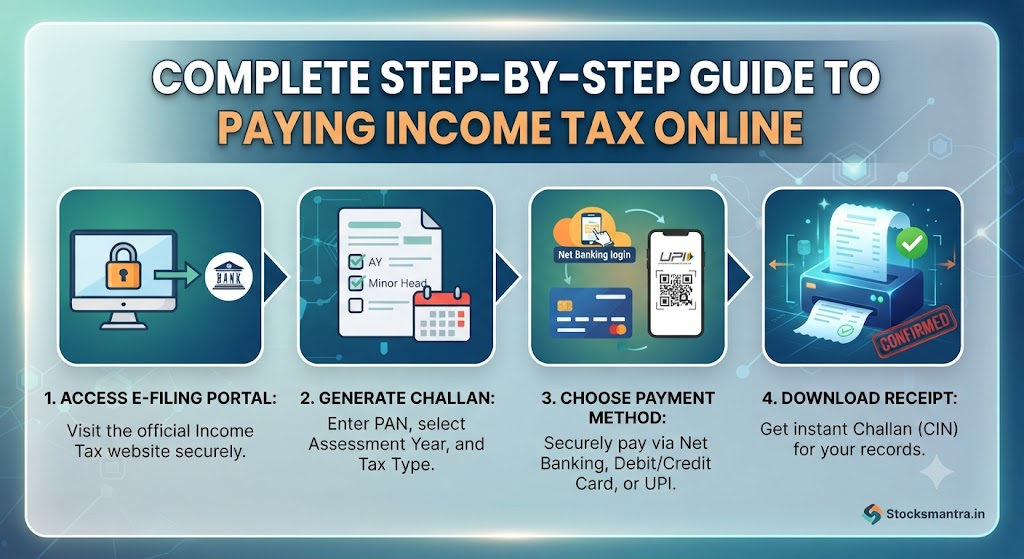
Step-by-Step Guide: How to Pay Income Tax Online
Follow these practical steps to complete your tax payment safely.
Step 1: Visit the Official Portal
Open the official income tax e-filing website in your web browser. Always make sure the web address ends with the official government domain suffix to avoid fraudulent phishing sites.
Step 2: Access the E-Pay Tax Section
You do not always need to log into your full account dashboard just to make a payment.
- On the home page, look for the quick links menu.
- Click on the e-Pay Tax option.
- Enter your PAN (Permanent Account Number), confirm it by entering it a second time, and provide your mobile number for OTP verification.
Step 3: Verify Your Identity
Enter the 6-digit One-Time Password (OTP) sent to your mobile number. Once verified, your masked PAN and name will appear on the screen. Confirm that these details belong to you before proceeding.
Step 4: Select the Correct Tax Category
You will see several tiles for different types of payments. For most individual taxpayers filing routine returns:
- Select Income Tax.
- Choose the correct Assessment Year (AY) from the drop-down menu (make sure you pick the current assessment year, not the financial year).
- Select the type of payment under Type of Payment (Minor Head)—choose Self-Assessment Tax (300) if you are paying dues while filing, or Advance Tax (100) if paying in advance.
Step 5: Enter the Tax Breakdown
Break down your total payment into precise financial components:
- Tax: The actual tax amount.
- Surcharge, Cess, or Interest: Fill these out only if applicable (leave them zero if your computation sheet shows no such dues). The system will automatically calculate the total sum. Click Continue.
Step 6: Choose Your Payment Mode
The portal redirects you to the payment gateway aggregation page. You can choose from multiple secure payment methods:
- Net Banking: Log into your personal or corporate bank account.
- Debit Card: Pay directly using an authorized bank debit card.
- UPI (Unified Payments Interface): Scan a QR code or use a virtual payment address (VPA) via apps like Google Pay or PhonePe.
- Credit Card: Pay using an authorized credit card (note that gateway convenience fees may apply).
- Over the Counter / NEFT / RTGS: Generate a mandate to pay physically at an authorized bank branch or through your bank’s corporate net banking portal.
Step 7: Complete and Download the Receipt
Once the bank authorizes the payment, the portal will bring you back to the income tax website and display a success message.
- Download the Challan Receipt immediately.
- Check the receipt for the Challan Identification Number (CIN), BSR code, and date of payment. You will need these details when filing your final tax return.
Real-World Considerations
Understanding the theory is helpful, but real-world tax payments involve a few practical operational realities:
- Processing Time: Payments made via net banking or UPI usually reflect instantly or within 24 hours. However, payments made through NEFT/RTGS or physical bank counters can take 2 to 3 working days to clear. Always plan your payments a few days before your filing deadline.
- Transaction Failures: If money gets deducted from your bank account but the portal shows a failure, do not panic. Wait 24 to 48 hours for automatic reconciliation. Check your passbook or bank statement to see if the amount was reversed. If the money was debited but the challan was not generated, raise a ticket on the helpdesk portal with your bank transaction reference number.
- Save Backup Copies: Always save a digital PDF copy of your challan receipt in a secure folder. Your tax return filing software or accountant will require the BSR code and challan serial number.
Common Mistakes to Avoid
Taxpayers often run into avoidable trouble due to simple oversights. Watch out for these pitfalls:
- Selecting the Wrong Assessment Year: Paying tax for the wrong assessment year creates a mismatch in the tax department’s database, leading to automated mismatch notices. Always double-check the year before clicking pay.
- Using Unverified Links: Never click on random links sent via SMS or email claiming to be direct tax payment gateways. Always navigate to the official government portal directly through your browser.
- Leaving Payment Until the Last Hour: Server traffic spikes heavily on the final day of tax filing. Slow load times can cause payment timeouts. Always pay your taxes a few days ahead of deadlines.
- Ignoring Minor Head Codes: Selecting Advance Tax instead of Self-Assessment Tax assigns your money to the wrong financial ledger bucket. Verify the minor head code on your tax computation sheet before proceeding.
Risks and Limitations
While online tax payments are secure and encrypted, certain operational risks remain:
- Phishing and Fake Websites: Fraudsters sometimes create lookalike websites that mimic government portals to steal banking credentials.
- How to reduce this risk: Check the browser address bar to ensure it belongs to the official government domain. Never share your net banking passwords or PINs over phone calls or chat support.
- Bank Gateway Outages: During peak tax season deadlines, bank payment gateways can occasionally experience technical downtime.
- How to reduce this risk: Keep an alternative payment method ready, such as a second bank account net banking login or a UPI app.
Key Terms
- Assessment Year (AY): The 12-month period starting April 1 in which income earned in the previous year is evaluated and taxed.
- BSR Code (Basic Statistical Return Code): A unique 7-digit code given to bank branches that process tax payments.
- Challan Identification Number (CIN): A unique receipt number combining the BSR code, challan tender date, and challan serial number, proving your tax payment.
- Financial Year (FY): The 12-month period from April 1 to March 31 during which you earn your income.
- Minor Head: A code used by the tax department to classify the exact nature of the tax payment (such as advance tax or self-assessment tax).
- Permanent Account Number (PAN): A unique 10-character alphanumeric identifier issued by the tax department to all taxpayers.
FAQs
1. Can I pay my income tax using a credit card?
Yes, the e-filing portal allows payments via credit cards through authorized payment gateways. However, banks or gateway providers may charge a small convenience fee or processing charge for credit card transactions.
2. What should I do if money was deducted from my account, but no challan was generated?
Wait for up to 48 hours. In most cases, banks automatically reconcile failed transactions and either generate the challan or refund the amount to your account. If the status does not update after 48 hours, contact your bank’s customer support with the transaction reference number.
3. Do I need to log in to my e-filing account to pay tax?
No. You can use the “e-Pay Tax” facility on the public landing page of the income tax portal without logging into a full account dashboard, as long as you have your PAN and an active mobile number for OTP verification.
4. What is the difference between Advance Tax and Self-Assessment Tax?
Advance tax is paid in installments during the financial year as you earn your income. Self-assessment tax is paid at the end of the financial year (or at the time of filing your return) to clear any remaining tax liability after accounting for TDS and advance tax.
5. Where can I find my BSR code and Challan Serial Number after payment?
Both numbers are printed clearly on the digital challan receipt (Form ITNS 280 / e-payment receipt) generated immediately after a successful transaction. You can also view and download past challans anytime by logging into your e-filing portal dashboard under the e-File menu.
6. Is it safe to use UPI for paying income tax?
Yes. UPI payments processed through authorized government payment gateways use secure, encrypted channels backed by the National Payments Corporation of India (NPCI).
7. What happens if I pay tax under the wrong Minor Head?
If you mistakenly select the wrong minor head code (for example, paying advance tax instead of self-assessment tax), you will need to submit a rectification request or approach your jurisdictional assessing officer to transfer the amount to the correct ledger head.
Conclusion
Paying income tax online is a straightforward process once you understand the basic steps and terminology. By verifying your assessment year, selecting the correct payment head, and keeping your digital challan receipt safe, you can clear your financial obligations securely and efficiently. Avoid last-minute rushes to ensure your payments process smoothly and your tax returns are filed on time.