Introduction
Finding an official communication from the tax authorities in your inbox or mailbox can make your heart skip a beat. Many people immediately assume they have done something wrong or are in serious legal trouble. In reality, modern tax systems rely heavily on automated matching. If the figures on your tax return do not match what your employer, bank, or mutual fund provider reported, an automated computer system flags it and generates a notice.
While the terminology can look intimidating, dealing with a tax notice is a routine administrative process. The biggest mistake you can make is ignoring it out of fear. Ignoring a notice often leads to financial penalties or legal complications that could have been easily avoided.
This guide will walk you through what an income tax notice is, why you received it, and how you can respond to it online in simple, clear steps.
What Is an Income Tax Notice?
An income tax notice is an official formal communication sent by the Income Tax Department to a taxpayer. It asks for clarification, provides information about a tax discrepancy, or informs you about the status of your tax return.
Think of it like a teacher checking your homework and asking, “You wrote 10 here, but your notebook says 12. Can you explain why?” It is not automatically a penalty or an accusation of tax evasion. It is simply a request to verify facts.
Why Does It Matter?
Responding correctly ensures that your tax records remain clean. If you ignore the notice, the tax department may assume you accept their calculation of any unpaid tax, which can lead to hefty fines, interest charges, or even automated adjustments to your tax refund.
Why Did You Receive an Income Tax Notice?
Tax notices are rarely sent at random. Most notices fall into a few common categories:
- Data Mismatch: The numbers you reported on your tax return do not match the data submitted by third parties like banks or employers. For example, if you forgot to report the interest earned on your savings account, the computer will spot the gap.
- Delayed Filing: Submitting your income tax return after the official due date can automatically trigger a notice or a penalty intimation.
- High-Value Transactions: Engaging in large financial transactions—such as buying property or making heavy credit card payments—that do not align with your declared income level.
- Random Scrutiny: Sometimes, returns are picked randomly for a detailed review to maintain tax system fairness.
How to Check Your Income Tax Notice Online
Before you can reply, you need to locate the official notice on the government portal. Never click on external email links claiming to be from the tax department, as phishing scams are common. Always log in directly through the official website.
Step-by-Step Checking Process:
- Visit the Official Portal: Go to the official income tax e-filing website.
- Log In: Enter your User ID (usually your Permanent Account Number or PAN), password, and captcha code.
- Navigate to Pending Actions: On the top menu bar, click on “Pending Actions”.
- Select e-Proceedings: Click on “e-Proceedings” to view any active notices, intimations, or demands issued against your PAN.
- Download and Read: Click on the notice notice number to view details. Download both the notice and any attached summary sheet to read offline.
Step-by-Step Guide: How to Reply to an Income Tax Notice Online
Once you understand what the tax department is asking, you can draft and submit your reply directly through the portal.
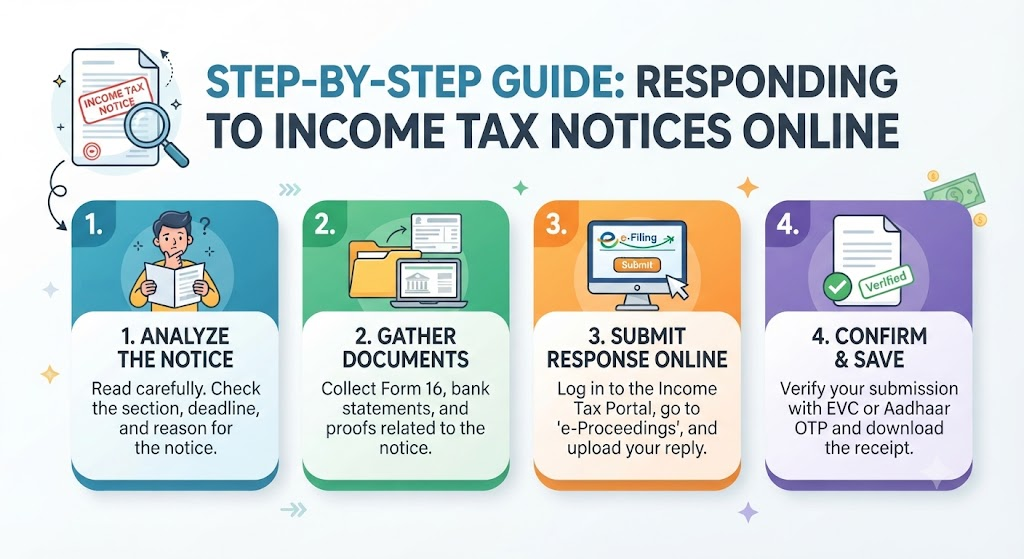
Step 1: Analyze the Notice Carefully
Read the notice line by line. Identify the specific section under which it was issued. Check if it is asking for clarification, additional documents, or payment of extra tax. Note down any deadlines mentioned, as missing the reply window can create serious legal hurdles.
Step 2: Gather Your Supporting Documents
Collect all relevant financial paperwork. Depending on the notice, this might include:
- Form 16 or Form 16A (issued by employers or banks)
- Bank statements showing interest or salary credits
- Investment proofs (receipts for life insurance, tuition fees, donations)
- Home loan interest certificates
Step 3: Go to the Response Section
Log back into the e-filing portal, navigate to Pending Actions > e-Proceedings, and select the active notice you wish to answer. Click on “Submit Response”.
Step 4: Choose Your Stance
The portal will typically give you options to agree or disagree with the notice:
- Agree: If the tax department is right (for example, you genuinely missed reporting a bank account’s interest), you can accept the adjustment, pay any due tax, and submit your agreement.
- Disagree: If you believe the tax department’s calculation is wrong, select “Disagree” and provide a detailed factual explanation.
Step 5: Draft Your Explanation Clearly
If you disagree or need to provide context, write a clear, polite, and factual response. Explain the situation in simple sentences. Avoid emotional language or complex legal jargon.
- Example: “Dear Assessing Officer, in response to notice reference number [XYZ], I would like to clarify that the discrepancy of ₹10,000 in interest income arose because a fixed deposit matured in a different financial year. Please find enclosed the bank statement confirming the correct date of credit.”
Step 6: Upload Supporting Files
Attach scanned copies or PDF files of your proofs. Make sure the files are clear, legible, and within the size limits specified by the portal.
Step 7: Submit with Electronic Verification
Review your entire response. Once satisfied, submit the reply using an Electronic Verification Code (EVC) sent to your registered mobile number or via your Aadhaar-linked OTP. Always download and save the Acknowledgment Receipt for your records.
Common Mistakes to Avoid
- Ignoring the Notice: Hoping it will go away is the worst approach. Interest and penalties compound over time.
- Using Fake Links: Clicking links in random SMS or email messages can compromise your financial security. Always log in manually.
- Missing Deadlines: Most notices give a strict time limit (such as 15 or 30 days). Set a calendar reminder to respond well before time.
- Vague Explanations: Writing emotional statements like “I don’t owe this money” without backing it up with bank statements or receipts will lead to rejection.
Risks and Limitations
While replying online is efficient, keep these operational limits in mind:
- Portal Glitches: Heavy web traffic near filing deadlines can cause the portal to slow down. Do not wait until the final hours to submit your reply.
- Document Clarity: Uploading blurry or corrupted PDF files can cause the tax officer to reject your response due to insufficient proof.
- Complex Cases: If a notice involves complex legal corporate restructuring or heavy international taxation, simple online responses may not suffice, and consulting a professional chartered accountant becomes necessary.
Decision-Making Framework: Should You Handle It Yourself or Hire Help?
Use this simple framework to decide if you need professional assistance:
- Can I handle it myself? Yes, if the notice is a simple mismatch in bank interest, minor dividend income, or a missing deduction that you can easily prove with your Form 16 or bank statement.
- Should I hire a Chartered Accountant (CA)? Yes, if the notice involves high-value property transactions, business tax audits, multi-layered capital gains calculations, or if the notice threatens legal prosecution or heavy penalties.
Checklist Before You Hit Submit
- Did I verify that I am logged into the official government tax portal?
- Did I check the exact section number and due date of the notice?
- Have I cross-verified my financial figures with my bank statements and Form 16?
- Is my written explanation clear, polite, and factual?
- Are all supporting PDF files clear and properly attached?
- Have I downloaded and saved the final submission acknowledgment receipt?
Key Terms
- PAN (Permanent Account Number): A unique 10-character alphanumeric identifier issued by the Income Tax Department to every taxpayer.
- Intimation Notice: A computerized notice sent under section 143(1) comparing your filed return with department data.
- Demand Notice: A notice stating that you owe additional tax, interest, or penalties to the government.
- EVC (Electronic Verification Code): A temporary code sent to your registered mobile number used to sign documents electronically.
- Assessing Officer: The tax official assigned to review complex tax filings and verify tax compliance.
FAQs
1. What happens if I completely ignore an income tax notice?
Ignoring a notice can lead to severe consequences, including monetary penalties, compounding interest charges, freezing of bank accounts, or in extreme cases, legal prosecution for tax evasion.
2. Can I reply to a tax notice offline?
Most responses must now be submitted digitally through the e-filing portal. In complex scrutiny cases, your assessing officer may ask you to attend video conferencing hearings or submit physical papers.
3. Do I always need a Chartered Accountant to reply to a notice?
No. If the notice is routine—such as a small mismatch in interest income—you can easily reply yourself using your bank statements and tax portal.
4. What should I do if I agree with the tax demand?
If the calculation is correct and you owe the tax, you can select “Agree” on the portal, pay the outstanding amount through the e-pay tax facility, and submit the challan receipt as proof.
5. Is there any fee for replying to a notice online?
No, submitting a response through the official Income Tax e-Filing portal is completely free of charge.
6. What if I miss the reply deadline?
If you miss the deadline, the portal may lock your ability to reply directly. You should immediately contact a tax professional to request condonation of delay or submit a belated manual appeal.
Conclusion
Receiving an income tax notice can be stressful, but it is a standard part of modern financial systems. By staying calm, reading the notice thoroughly, gathering your financial proof, and responding clearly through the official portal, you can resolve most issues quickly. Always prioritize honesty, keep your documents organized, and do not wait until the final deadline to submit your reply.