Introduction
Filing taxes used to feel like working in the dark. Many taxpayers had to guess or collect physical certificates to remember every source of income during the financial year. Missing even a small bank interest payout or a capital gain from a mutual fund could trigger an automated tax notice months later.
To solve this problem, the Indian Income Tax Department introduced two powerful tools: AIS and TIS. These digital statements act as a financial mirror, showing you all the financial data the tax authorities have collected about you from banks, employers, mutual fund houses, and stockbrokers.
Understanding how AIS and TIS work helps you file your tax returns accurately, protect yourself from penalties, and claim the correct refunds without stress.
What Is AIS (Annual Information Statement)?
The Annual Information Statement (AIS) is a comprehensive document that shows a wide range of financial transactions linked to your Permanent Account Number (PAN). Think of it as a complete ledger of your economic activity tracked by the government during a financial year.
Why Does It Matter?
In the past, tax departments relied heavily on Tax Deducted at Source (TDS) certificates. If a bank or company forgot to deduct TDS on a transaction, that income often went unreported. AIS changes this by gathering data from many different sources, including banks, stock exchanges, registrars, and foreign remittance providers.
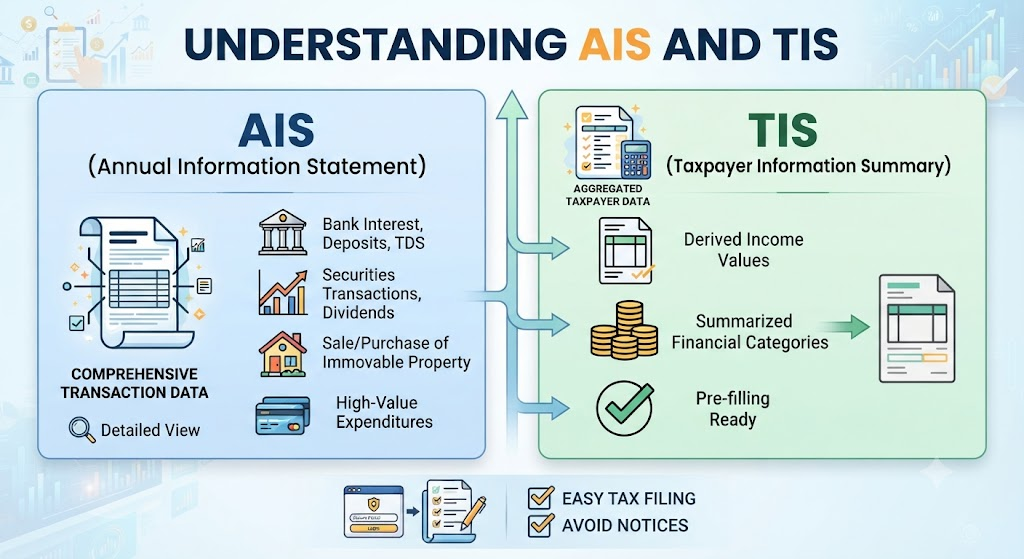
What Type of Information Appears in AIS?
- Salary and Pension: Earnings reported by your employer.
- Interest Income: Earnings from savings accounts, fixed deposits, and recurring deposits.
- Dividend Income: Payouts received from shares and mutual funds.
- Securities Transactions: Buying and selling of shares, mutual funds, bonds, and debentures.
- High-Value Transactions: Cash deposits, credit card payments, purchase of property, and foreign travel expenses.
What Is TIS (Taxpayer Information Summary)?
The Taxpayer Information Summary (TIS) is a derived summary of your AIS. While AIS gives you raw, detailed transaction data, TIS aggregates that data into broader categories and calculates a derived value for tax filing.
Why Does It Matter?
If AIS is like a raw basket of grocery items, TIS is the organized receipt showing the total weight and cost of each category. TIS groups your information into simple buckets, making it easier for you to see how your various income sources sum up. The income tax utility and pre-filled ITR forms often use values derived directly from the TIS.
How AIS and TIS Work Together
Both statements complement each other to give you a complete picture of your financial profile before you file your tax return.
- Data Collection: Financial institutions report your transactions to the tax department.
- AIS Generation: The system processes this raw data and generates the AIS.
- TIS Derivation: The system condenses the AIS data into summarized categories within the TIS.
- Pre-filling: The income tax portal uses the TIS data to pre-fill parts of your ITR form.
- Feedback Loop: If you find an error in your AIS, you can submit online feedback to correct it.
Key Differences Between AIS and TIS
To understand how to read these statements, it helps to compare their main features side by side.
| Feature | Annual Information Statement (AIS) | Taxpayer Information Summary (TIS) |
| Data Type | Detailed transaction-level information | Aggregated and summarized information |
| Primary Purpose | To let taxpayers view all reported financial data | To provide a simplified tax computation summary |
| Structure | Divided into Part A (General Info) and Part B (Financial Details) | Divided into distinct financial categories and derived totals |
| Feedback Option | Allows feedback on every single transaction | Reflects changes made after processing AIS feedback |
Why AIS and TIS Matter for Every Taxpayer
Ignoring your AIS and TIS can lead to costly mistakes. Here is why you should check them before submitting your return:
- Avoids Mismatch Notices: If your ITR reports lower income than what is recorded in your AIS, the tax department’s automated systems may send you a discrepancy notice.
- Prevents Omissions: It is easy to forget interest earned on an old savings account or a small dividend payout. AIS ensures you do not miss anything.
- Tracks Capital Gains: Calculating capital gains from stock trading can be complicated. AIS provides a consolidated view of your security transactions to help verify your calculations.
- Protects Against Identity Theft: If you spot a transaction, loan, or credit card payment in your AIS that you did not make, it could signal fraudulent use of your PAN.
Common Mistakes Taxpayers Make with AIS and TIS
Avoiding common traps saves you from unnecessary tax complications.
- Mistake 1: Relying 100% on Pre-filled Data without Checking.Why it happens: The ITR form is pre-filled, so people assume it is always error-free.Why it causes problems: Financial institutions sometimes report incorrect data or duplicate entries.What to do instead: Always download and review your AIS and TIS manually, and match them with your bank statements and salary slips.
- Mistake 2: Ignoring Minor Income Entries.Why it happens: Taxpayers assume small savings bank interest amounts do not matter.Why it causes problems: Automated systems match total numbers down to the last rupee. Even small gaps can trigger mismatch flags.What to do instead: Report all legitimate income sources in your tax return.
- Mistake 3: Failing to Submit Feedback for Errors.Why it happens: Taxpayers notice a wrong entry in AIS but ignore it because they filed their ITR correctly.Why it causes problems: The error will reappear in future years or cause ongoing discrepancies.What to do instead: Use the online feedback facility on the income tax portal to flag incorrect information.
How to Access Your AIS and TIS
Checking your statements takes only a few minutes through the official government portal:
- Go to the official Income Tax e-Filing Portal (incometax.gov.in).
- Log in using your User ID (PAN), password, and security code.
- Navigate to the top menu and click on “Services”.
- Select “Annual Information Statement (AIS)”.
- Click on “Proceed”, which will redirect you to the designated compliance portal.
- Choose the relevant Financial Year and download your AIS or TIS in PDF or JSON format.
Step-by-Step Verification Checklist Before Filing ITR
Before you submit your final tax return, run through this quick checklist:
- Download the latest AIS and TIS statements for the relevant financial year.
- Verify your personal information (name, PAN, address, and bank accounts).
- Compare salary and TDS details with your Form 16.
- Check savings account and fixed deposit interest against your passbooks or bank interest certificates.
- Verify capital gains from stock and mutual fund statements.
- Submit online feedback for any incorrect or duplicate entries in your AIS.
- Ensure your final ITR figures match or account for any verified discrepancies in your TIS.
Key Terms
- PAN (Permanent Account Number): A unique ten-digit alphanumeric number issued by the Income Tax Department to track financial transactions.
- TDS (Tax Deducted at Source): Tax deducted by the payer at the exact time of making payment, such as an employer paying salary or a bank paying interest.
- Form 16: A certificate issued by your employer detailing your salary breakdown and the TDS deposited on your behalf.
- Derived Value: A calculated financial figure generated in the TIS by combining multiple related transaction entries.
- Feedback Facility: An online feature on the income tax portal that lets taxpayers accept, reject, or modify data shown in their AIS.
Frequently Asked Questions
1. Is it mandatory to match my ITR with AIS and TIS?
Yes. While the law requires you to report your true income, matching your ITR with AIS and TIS ensures your return aligns with government records, reducing the chance of receiving an automated mismatch notice.
2. What should I do if my AIS shows income that does not belong to me?
You can use the feedback feature on the AIS portal. Click on the specific information item, select an appropriate feedback reason (such as “Information is incorrect” or “Transaction is not fully related to me”), and submit it.
3. Does a mismatch between AIS and TIS mean I will face a penalty?
Not immediately. A mismatch usually triggers an automated email or SMS asking you to clarify or revise your return. However, ignoring genuine income discrepancies can lead to tax demands, interest charges, and penalties.
4. Why is some of my income missing from the AIS?
AIS relies on data reported by third-party institutions. If a small cooperative bank or entity has delayed its reporting cycle, the data may take time to appear. You are still legally required to report all earned income, even if it is missing from your AIS.
5. Can I edit the data inside my AIS?
You cannot directly edit government records, but you can submit digital feedback on any entry. When you submit feedback, the tax department reviews it and updates the status in your summary.
6. Do senior citizens who do not have taxable income need to check AIS?
Even if your income is below the taxable limit, checking your AIS is a good practice to monitor your financial footprint and ensure no fraudulent transactions or loans have been linked to your PAN.
7. Which statement should I trust more: AIS or my own bank statements?
Your primary records—like salary slips, bank statements, and investment reports—are your true financial baseline. If AIS contains an error, report it, but always base your tax calculations on your actual verified income and expenses.
Conclusion
The Annual Information Statement (AIS) and Taxpayer Information Summary (TIS) are designed to make tax filing transparent and straightforward. By consolidating your financial data into one accessible dashboard, they help you see what the tax department sees before you submit your return.
Take a few minutes to download your statements, verify your numbers, and file your taxes with confidence. A little attention to detail today saves you from compliance hassles tomorrow.