Introduction
For small business owners and traders, receiving a formal communication from the tax department can be an unsettling experience. The complex nature of Goods and Services Tax (GST) often leads to notices being issued for routine data mismatches, return filing delays, or input tax credit discrepancies. Understanding how to handle these communications is a critical skill for maintaining a healthy business.
This guide provides a clear, practical, and step-by-step approach to responding to GST notices online, ensuring you remain compliant and confident in your business operations.
Understanding GST Notices
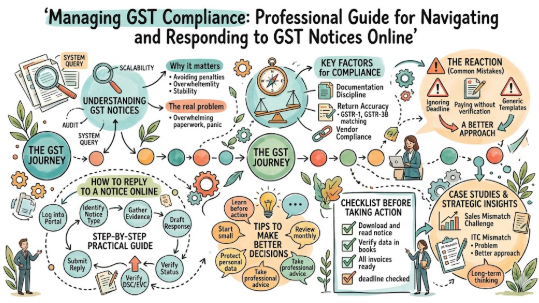
A GST notice is a formal communication sent by the tax authorities to a taxpayer. Think of it as a request for clarification regarding your tax filings. It is not always a sign of wrongdoing; often, it is simply a system-generated query triggered by data mismatches in the GST portal.
These notices are used for three main purposes: return documentation checks, verification of Input Tax Credit (ITC), and audit requirements. By understanding the specific form number (like ASMT-10 for scrutiny or GSTR-3A for non-filing), you can pinpoint exactly what the department needs from you.
Why Responding to Notices Matters
Timely compliance isn’t just about avoiding penalties; it’s about business stability.
- Cash Flow Protection: Ignoring a notice can lead to the freezing of your Input Tax Credit (ITC) or even your bank account, causing severe liquidity issues.
- Interest and Penalties: Late responses often attract interest under Section 50 of the CGST Act, which drains your profit margins.
- Business Reputation: Maintaining a clean compliance record ensures you are eligible for government tenders, loans, and easier credit terms from banks.
The Real Problem Taxpayers Face With GST Notices
The primary challenge is the overwhelming nature of tax documentation. Many small business owners rely on social media advice or outdated templates, leading to incomplete or inaccurate replies. Furthermore, the fear of “legal action” often causes panic-driven decisions, such as paying unjustified tax demands without proper verification, which can lead to double taxation.
How to Reply to a GST Notice Step by Step
Follow this structured approach to ensure your reply is professional and legally sound.
- Identify the Notice Type: Log into the GST portal and download the PDF. Check the Section and Form number to understand the “why” behind the notice.
- Gather Evidence: Collect all supporting documents, such as sales invoices, purchase bills, bank statements, and E-way bills, that prove your side of the story.
- Draft Your Response: Use a formal letter format. Address the specific points raised in the notice point-by-point. Do not provide information not asked for.
- Login to the Portal: Navigate to
Services > User Services > View Notices and Orders. - Submit the Reply: Click the ‘Reply’ button against the notice reference number. Upload your drafted response and supporting documents (PDF format).
- Verify with DSC/EVC: Sign the reply using your Digital Signature Certificate (DSC) or an Electronic Verification Code (EVC) sent to your registered email/phone.
- Track Status: Always check the portal later to see if your status has moved to “Reply filed by Taxpayer.”
- Retain Records: Save a copy of your submitted reply and the acknowledgement for future audits.
Key Factors That Influence GST Compliance
- Documentation Discipline: Maintaining a file of every invoice, bill, and credit note is the most effective way to defend yourself.
- Return Accuracy: Regularly reconciling GSTR-1 (sales) and GSTR-3B (tax paid) against your books of accounts.
- Vendor Compliance: Ensure your suppliers are filing their returns; if they don’t, you lose your ITC, which often triggers scrutiny notices.
- Professional Review: Periodic audits by a tax expert can catch discrepancies before the government does.
Common Mistakes Beginners Make With GST Notices
- Ignoring the Deadline: Every notice has a response window (often 7, 15, or 30 days). Ignoring it triggers automated recovery proceedings.
- Paying Without Verification: Some taxpayers pay the demand immediately out of fear. If your records prove you owe nothing, paying is a waste of capital.
- Incomplete Data: Uploading only a part of the evidence. You must provide a “full trail”—from the invoice to the bank transaction.
- Using Generic Templates: Copy-pasting a template without editing it to match your specific notice reference will likely lead to rejection.
Don’t Do This Checklist
- Do not panic; most notices are routine system queries.
- Do not submit a reply without cross-referencing your books.
- Do not ignore the “Personal Hearing” request box if the matter is complex.
- Do not provide emotional justifications; stick to facts and figures.
Practical Real-Life Examples of Handling Notices
| Scenario | Challenge | Better Approach |
| Sales Mismatch | GSTR-1 doesn’t match 3B. | Reconcile records and file an amendment to correct the data before replying. |
| ITC Mismatch | Vendor didn’t file return. | Communicate with the vendor to file their returns; present proof of payment in the reply. |
Two Useful Tables for Better Understanding
Common GST Notice Types
| Form Name | Reason | Action Required |
| GSTR-3A | Non-filing of returns | File pending returns + late fees |
| ASMT-10 | Discrepancies in returns | Provide justification in ASMT-11 |
| REG-17 | Potential Registration Cancellation | Submit reply in REG-18 |
Mistake vs. Correct Approach
| Mistake | Correct Approach |
| Ignoring a notice in the portal | Regularly checking ‘View Notices and Orders’ |
| Uploading large, unorganized files | Creating a concise, point-by-point PDF |
| Assuming the officer is ‘out to get you’ | Providing factual, evidence-based data |
Tools, Methods, and Frameworks Readers Can Use
- GST Reconciler Tool: Use accounting software to match GSTR-2B against your purchase ledger monthly.
- Compliance Calendar: Create a simple Excel sheet tracking all your return due dates to prevent GSTR-3A notices.
- Digital Filing System: Organize all invoices in folders by Month/Financial Year to ensure instant retrieval if a notice arrives.
Expert Tips to Make Better Decisions
- Start Small: If you are a new trader, hire a tax consultant for the first few months to understand the nuances.
- Verify, Then Pay: Always ensure the demand is valid before paying any penalty.
- Keep Records for 6 Years: Legal requirements often mandate keeping financial records for this duration.
- Avoid Emotional Decisions: Tax authorities operate on data. Keep your language professional and objective.
- Use E-Invoicing: Even if not mandatory, it creates a digital trail that is difficult to dispute.
Risk Awareness: What Readers Must Check First
- Cybersecurity Risk: Ensure your GST login credentials (password/DSC) are not shared with unauthorized parties.
- Platform Risk: Only use the official
www.gst.gov.inwebsite. Avoid third-party links that claim to “fix” notices for a fee. - Compliance Risk: Failing to report even a small invoice can be viewed as an attempt to evade taxes. Always be transparent.
Checklist Before Taking Action
- I have downloaded and read the full notice.
- I have verified the data in my books against the portal.
- I have all invoices/payment proofs ready as attachments.
- I have consulted a tax professional for complex legal points.
- I have checked the deadline and submitted well in advance.
Frequently Asked Questions
- What is a GST notice?
It is a formal communication from the department seeking clarification on tax filings. - Is receiving a GST notice a sign of fraud?
No, most are routine system-generated queries about data mismatches. - How do I know if I have a notice?
Log in to the GST portal and visitServices > User Services > View Notices and Orders. - Can I reply to a GST notice online?
Yes, the entire process is digitized through the official portal. - What happens if I don’t reply?
The department may issue an ex-parte order, imposing heavy penalties or interest. - Should I hire a professional?
For complex notices or high-value demands, professional guidance is strongly recommended. - Do I need a DSC to reply?
Yes, or an EVC to verify your identity before submission. - How long do I have to reply?
Usually 7 to 30 days, as specified in the notice. - Can I request more time?
Yes, you can request an extension, but this must be done before the deadline. - Where can I find the format for a reply?
The portal provides a text box, or you can attach a formal PDF letter. - Does this apply to salaried people?
No, GST is for business owners, traders, and service providers. - What is the best next step?
Start by reconciling your sales and purchase records immediately.
Conclusion and Next Steps
Responding to a GST notice might feel overwhelming, but when broken down into logical steps, it is a manageable task. The core of effective compliance lies in record-keeping and timely action. By maintaining clean books and staying proactive with your filings, you reduce the likelihood of receiving notices in the first place.
Always remember that the goal of a reply is to provide facts. Avoid assumptions and ensure that every claim you make is backed by a document. If you are unsure about the legal implications of a specific notice, do not hesitate to contact a qualified Chartered Accountant (CA) or tax consultant. Financial awareness is your best defense against unnecessary tax complications.
Leave a Reply