Introduction
Navigating the Indian taxation ecosystem can feel like walking through a complex maze, especially for new startup founders, small business owners, and freelance professionals. Among the multiple compliances required under the Goods and Services Tax (GST) framework, filing your sales return is often the very first hurdle. If you find yourself confused by terms like B2B invoices, HSN summaries, or amendment tables, you are not alone. Beginner confusion around GSTR-1 is incredibly common because a single clerical mismatch can disrupt your entire supply chain.
Filing your sales data accurately is a foundational business requirement. When you upload your sales invoices correctly, the data flows seamlessly into your customers’ tax dashboards, allowing them to claim their rightful tax credits. However, an incorrect entry can lead to blocked credits, strained buyer relationships, and potential compliance notices from the tax department.
In this comprehensive, high-quality guide, we will break down the entire online filing mechanism into simple, everyday language. You will learn exactly what data to collect, how the online portal functions, and how to execute the filing sequence securely. This practical walkthrough will help you master the process, protect your venture from penalties, and build long-term business credibility.
What Is GSTR-1?
GSTR-1 is a monthly or quarterly statutory return that contains the comprehensive details of all outward supplies of goods and services made by a registered taxpayer. In simple terms, it is your formal sales report to the Government of India. Every transaction where you sell products or render services to a client must be categorized and recorded here.
It is crucial to understand that GSTR-1 is strictly an information-reporting statement. You do not pay any tax liability directly while filing this specific form. Instead, the total sales figures and tax amounts you declare here establish your official tax liability for the tax period.
Many beginners confuse GSTR-1 with GSTR-3B, but they serve entirely distinct purposes. While GSTR-1 acts as a detailed invoice-by-invoice statement of your outgoing sales, GSTR-3B is a simplified monthly summary return where you actually offset your liabilities using Input Tax Credit (ITC) and pay the remaining balance via cash.
The Supply Chain Connection: The information you submit in your GSTR-1 is dynamically captured by the GST network and auto-populated into your buyers’ GSTR-2B statement. This is the mechanism that allows your business clients to view and claim their ITC. Therefore, timely and accurate reporting is vital for maintaining healthy, professional B2B client relationships.
Who Needs to File GSTR-1?
Every business entity or professional holding an active regular GST registration is usually required to file GSTR-1. This requirement applies regardless of whether you had any active sales transactions during the specific tax period. If your business recorded zero sales during a month, you are still legally obligated to file a Nil GSTR-1 return to stay compliant.
The compliance requirements vary depending on your specific business category, industry type, and aggregate annual financial turnover:
- Business-to-Business (B2B) Sellers: Manufacturers, wholesale distributors, and service firms selling to other registered entities must report every single invoice line-by-line.
- Business-to-Consumer (B2C) Traders: Retailers, local shop owners, and service providers selling to unregistered end-consumers must report their consolidated sales data.
- Freelancers and Independent Consultants: Registered software developers, creative designers, and consultants providing cross-border or domestic professional services must disclose their earnings and applicable integrated or central taxes.
- E-commerce Sellers: Digital merchants selling products through online marketplaces must document their platform-mediated transactions, accounting for state-specific consumer locations.
The specific filing frequency depends entirely on the taxpayer’s choice and annual revenue thresholds. Regular taxpayers with an aggregate annual turnover exceeding ₹5 crore are strictly mandated to file on a monthly basis. Meanwhile, small businesses with an annual turnover up to ₹5 crore can choose between filing monthly or selecting the Quarterly Return Monthly Payment (QRMP) scheme based on their operational preferences.
GSTR-1 Sections and Details
The online GST portal organizes your outward supplies into multiple numbered blocks called tables. Each table is designated to hold a specific category of sales data. To navigate the online form efficiently, you must understand what each block represents.
The following table provides a breakdown of the core sections you will interact with inside the GSTR-1 dashboard:
Table 1: GSTR-1 Sections and Details Table
| GSTR-1 Section | What It Usually Includes | Beginner-Friendly Meaning |
| B2B Invoices | Sales to registered businesses | Invoice-wise GST details for buyers |
| B2C Large | Large unregistered sales | High-value consumer sales reporting |
| B2C Others | Small unregistered sales summary | Consolidated small consumer sales |
| Credit/Debit Notes | Invoice adjustments | Returns, discounts, corrections |
| HSN/SAC Summary | Product/service codes | Classifies goods/services for GST |
| Nil/Exempt Supplies | Non-taxable or exempt | Reporting zero-rated or exempt sales |
Documents and Data Required Before Filing GSTR-1
Before you log into the official government portal, you should gather and organize your business documentation. Scrambling for data mid-way through a live session can cause your web browser to timeout, leading to potential data loss or duplicate entries.
Make sure you have a structured summary containing the following critical components:
- Active GSTIN Profiles: A list of your B2B buyers’ valid 15-digit Goods and Services Tax Identification Numbers to ensure accurate systemic mapping.
- Core Sales Invoices: A comprehensive set of all tax invoices issued during the reporting period, showing sequential serial numbers and generation dates.
- Official Credit and Debit Notes: Documentation for any structural price modifications, product returns, or supplementary charges issued to customers.
- HSN and SAC Code Directories: The specific Harmonized System of Nomenclature codes for physical commodities or Service Accounting Codes for professional services, along with total quantities sold.
- Place of Supply (POS) Identifiers: Accurate state names indicating where the goods were delivered or where services were consumed, which determines whether you apply CGST/SGST or IGST.
- Taxable Value Records: The net base value of your goods or services after deducting commercial discounts but before calculating any tax.
- Tax Component Split: The exact break-up of Integrated GST (IGST), Central GST (CGST), and State GST (SGST) or Union Territory GST (UTGST) calculated at standard tariff percentages.
- E-commerce Platform Summaries: Merchant sales reports from digital marketplaces detailing transactions where tax collection at source is applicable.
How to File GSTR-1 Step by Step
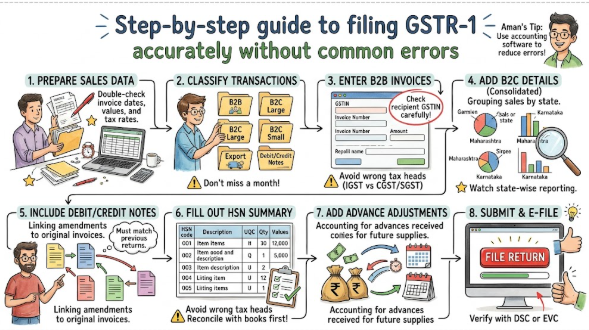
Filing your sales return involves a series of sequential checkpoints that must be followed in order. Skipping a step or validating fields out of order can result in validation failures on the server. Follow this step-by-step sequence to complete your filing smoothly:
1.Data Collection and Internal Reconciliation:Step 1: Preparation.
Gather your sales registers and reconcile your billing software data against your generated invoice copies. Verify that your total taxable value matches your internal books of accounts perfectly before attempting to enter data on the portal.
2.Establish Portal Access and Navigate:Step 2: Dashboard Navigation.
Access the official government portal and log in securely using your authorized credentials. Click through Services, navigate to Returns, select the Returns Dashboard, and choose the specific financial year and tax filing period.
3.Select Return and Choose Entry Mode:Step 3: Mode Selection.
Locate the Details of outward supplies of goods or services (GSTR-1) card. Click Prepare Online for direct data entry, or use the offline utility tool if you are uploading large batches of invoice data via a generated JSON file.
4.Populate B2B and B2C Supply Data:Step 4: Invoice Upload.
Open the designated invoice tables sequentially. Type in individual B2B sales invoices, making sure the client’s trade name updates correctly upon entering their GSTIN, and log your aggregated B2C sales totals sorted by state-wise tax rates.
5.Log Commercial Adjustments and Notes:Step 5: Credit/Debit Notes Entry.
Navigate to the Credit/Debit Notes section to log any formal value revisions or customer returns. Link these adjustments directly to their original invoice reference numbers where applicable under current systemic fields.
6.Furnish HSN/SAC and Document Summaries:Step 6: Statistical Reporting.
Input your mandated HSN summary details, providing the code, net volume, total valuation, and rate breaks. Scroll down to enter the total count of invoices issued, cancelled, and net active documents utilized during the period.
7.Trigger Document Generation and Preview:Step 7: Data Validation.
Scroll to the bottom of the form and click Generate Summary. Wait a couple of minutes for the portal to compute the values, then refresh the page and click Preview Draft to download a PDF review sheet.
8.Execute Digital Authentication and Submit:Step 8: Final Verification.
Check the legal declaration checkbox and select your authorized signatory’s name. Finalize your submission using a Digital Signature Certificate (DSC) for corporate entities, or an Electronic Verification Code (EVC) OTP sent to the registered mobile number for sole proprietorships.
Entering B2B Invoice Details
Reporting Business-to-Business (B2B) invoices requires meticulous precision because your client’s business relies on this data to claim input tax credits. This data entry should be handled systematically through the online dashboard.
- Click on Table 4A, 4B, 4C, 6B, 6C – B2B Invoices to open the reporting grid.
- Click the Add Record button to launch a fresh entry screen.
- Input the buyer’s 15-digit GSTIN. The system will automatically search the database and display their registered legal name in the adjacent field. If the name does not match your records, double-check the identification number for errors.
- Enter the unique, sequential invoice number, the precise invoice date, and the total gross invoice value including taxes.
- Select the correct Place of Supply (POS) from the dropdown menu. This selection tells the portal whether to unlock the IGST field for interstate transactions or the CGST/SGST fields for intrastate deals.
- Scroll down to the tax assessment grid and locate the specific tax rate row that applies to your product or service (e.g., 5%, 12%, 18%, or 28%).
- Type your net base value into the Taxable Value column. The portal will automatically calculate the central, state, or integrated tax amounts based on the selected rate. Verify these calculations against your invoice copy before saving.
Entering B2C Details
When selling directly to unregistered individuals or end-consumers, you do not need to log every transaction one-by-one. Instead, the portal allows you to report these sales in a simplified, consolidated format based on value thresholds and geographic locations.
- Table 5 – B2C (Large) Invoices: This table is specifically reserved for interstate sales made to unregistered buyers where the individual invoice value exceeds ₹2.5 lakh. To report these, you must enter the specific invoice number, transaction date, delivery destination state, taxable value, and tax rate.
- Table 7 – B2C (Others): This section handles the vast majority of regular consumer transactions, including all local intrastate sales of any amount, and small interstate consumer invoices under ₹2.5 lakh.
- To populate Table 7, you simply add rows that group your sales by location and tax percentage. For instance, if you made fifty small sales to retail customers within your home state at an 18% tax rate, you add a single row for that state, choose 18%, and enter the combined taxable value of all fifty receipts.
- Ensure you deduct the value of any retail consumer returns from these totals to present a clean, net taxable turnover figure.
Reporting Credit/Debit Notes and Amendments
Business operations frequently require corrections after an invoice has been issued. Whether a customer returns defective stock, a pricing error occurs, or a clerical typo slips through, you must record these changes using formal accounting notes or systemic amendments.
- Table 9B – Credit/Debit Notes (Registered): Use this block to log adjustments issued to regular B2B business clients. Enter the buyer’s GSTIN, the note number, note date, note type (Debit or Credit), taxable value, and tax breakdown.
- Table 9B – Credit/Debit Notes (Unregistered): Use this section for commercial notes issued to retail consumers, specifically relating to high-value B2C Large transactions or export adjustments.
- Table 9A – Amended B2B Invoices: If you discover that you entered an incorrect invoice number, wrong date, or mismatched tax value in a previously filed return, you can correct it here. Select the relevant past financial year and month, enter the original document number to locate the file, and input the corrected parameters.
- Table 10 – Amended B2C Others: This section allows you to correct any state-wise or rate-wise summary mix-ups made in your past retail reporting blocks.
Real-Life Example: A Small Trader’s Filing Journey
To understand how these rules apply in day-to-day business, let us follow a practical example. Imagine a small enterprise called Alpha Tech Solutions, a trader of electronic goods based in Maharashtra.
During a standard monthly filing period, Alpha Tech Solutions records three distinct transaction types:
- Transaction 1: They sell computer hardware worth ₹1,00,000 (taxed at 18% GST) to a corporate client in Mumbai who holds an active GSTIN.
- Transaction 2: They sell a high-end graphics workstation worth ₹3,00,000 (taxed at 18% GST) to an unregistered individual animator living in Bangalore.
- Transaction 3: They sell twenty small smartphone accessories totaling ₹40,000 (taxed at 12% GST) to local retail walk-in customers at their storefront.
When the business owner logs into the official portal to file GSTR-1, they distribute this sales data across the appropriate sections. Transaction 1 is entered in the B2B section (Table 4), where they input the client’s GSTIN to ensure the ₹18,000 tax credit transfers to the client’s dashboard. Transaction 2 is a high-value interstate sale to an unregistered person, so it is recorded in the B2C Large section (Table 5). Finally, the twenty small storefront sales are combined into a single entry under the B2C Others section (Table 7) for Maharashtra at the 12% tax rate row.
By categorizing their sales this way, the trader presents a clear, organized return that aligns perfectly with their invoice records.
GSTR-1 Filing Frequency and Due Date
Filing timelines are strictly governed by statutory deadlines. Missing these dates leads to automated systemic blocks on successive returns and carries financial penalties. Taxpayers must track these deadlines based on their filing frequency:
- Monthly Filing Mode: This is the standard requirement for taxpayers with an annual turnover exceeding ₹5 crore, or smaller entities who prefer a monthly cycle. The deadline is firmly set for the 11th day of the succeeding month (for example, sales made in May must be filed by June 11th).
- Quarterly Filing Mode (QRMP Scheme): Designed for small businesses with an aggregate turnover up to ₹5 crore who opt out of monthly filings. The return must be submitted by the 13th day of the month following the end of the quarter (for example, the April–June quarter must be filed by July 13th).
Important Caution on Late Fees: If you delay filing your GSTR-1, the portal automatically calculates a late fee. This fee accumulates daily from the morning after the due date until you officially file the return. The standard late fee is ₹50 per day for active business returns, and ₹20 per day for Nil returns. This fee must be paid in cash through a generated payment challan when filing your upcoming GSTR-3B summary return.
Common Errors While Filing GSTR-1
Even experienced accountants can make simple mistakes when handling large volumes of financial data. Reviewing your return for these common entry errors before final submission can save your business from future compliance issues:
- Mismatched Invoice Numbers: Typing sequential invoice numbers incorrectly (e.g., writing INV-104 instead of INV-0104) makes it difficult to track modifications and reconcile documents later.
- Confusing CGST/SGST with IGST: Selecting the wrong Place of Supply can cause you to apply local taxes instead of integrated taxes on interstate sales. This error requires tedious structural corrections in later returns.
- Typographical Tax Rate Errors: Accidentally placing a base valuation amount into the 5% column instead of the 18% column distorts your tax calculations and creates tax shortfalls.
- Incorrect Customer GSTIN Entry: Failing to verify a client’s trade profile can link an invoice to the wrong business account. This prevents your customer from receiving their input tax credit.
- Omiting Credit and Debit Notes: Forgetting to record customer returns or discounts skews your total net turnover, causing you to overpay taxes in your summary return.
- Omitting the HSN/SAC Summary Table: Skipping the mandatory product-code reporting table triggers a validation error on the portal, preventing you from completing your final submission.
GSTR-1 Filing Checklist
To ensure your return is complete and error-free, run through this comprehensive checklist before executing the final digital authentication step.
Table 2: GSTR-1 Filing Checklist Table
| Checklist Point | Status |
| Sales invoices collected | Yes/No |
| B2B invoices verified | Yes/No |
| B2C summary checked | Yes/No |
| Credit/debit notes reviewed | Yes/No |
| HSN/SAC summary checked | Yes/No |
| Taxable value and GST rate verified | Yes/No |
| Return preview reviewed | Yes/No |
| GSTR-1 filed and acknowledgment saved | Yes/No |
Practical Tips to File GSTR-1 Correctly
- Implement Dedicated Billing Software: Avoid tracking sales manually in basic spreadsheets. Transition to modern, GST-compliant accounting software that formats your data automatically and exports clean, error-free files.
- Verify Buyer Profiles Instantly: Make it a standard practice to verify every new B2B client’s GSTIN using the portal’s search tool before finalizing contracts or processing orders.
- Run Regular Internal Audits: Cross-check your monthly sales ledger against your generated e-way bills and e-invoices to catch and resolve discrepancies early.
- Break Down Large Datasets Dynamically: If your business handles hundreds of transactions monthly, use the government’s official offline utility tool to build, validate, and upload your data batches smoothly.
- Maintain Sequential Invoice Numbering: Use a clean, uninterrupted numbering system for your invoices. This makes data entry straightforward and keeps your document summary table organized.
- File Early to Beat Portal Traffic: Avoid waiting until the due date to file. High web traffic on deadline day can cause slow page loads and processing delays.
What Happens if GSTR-1 Is Filed Incorrectly
Filing an incorrect GSTR-1 return can trigger a chain reaction of operational and financial complications for both your business and your clients.
- Blocked Client Tax Credits: If you enter a client’s GSTIN incorrectly or omit their invoice entirely, the transaction will not appear in their GSTR-2B dashboard. As a result, their internal accounting team will block your outstanding payments until the data is corrected.
- Automated System Reconciliation Flags: The portal’s automated systems constantly cross-verify your detailed GSTR-1 sales figures against the summary numbers you report in GSTR-3B. Any noticeable differences can trigger systemic warning flags.
- Official Compliance Notices: Significant or persistent differences between your sales reports and your tax payments may prompt the tax department to issue automated clarification notices, requiring formal explanations from your team.
- Red Flags on Your GST Profile: Repeated filing errors or frequent, heavy adjustments can lower your compliance rating on the portal, making your business appear less reliable to potential corporate clients.
When Should You Take Professional Help
While the online portal is designed to be accessible, certain business situations require specialized tax expertise to handle correctly. Consider consulting a certified Chartered Accountant or a qualified GST professional in the following scenarios:
- Handling Large Volumes of Data: If your business expands and begins processing thousands of multi-state invoices each month, a professional can help secure your data pipeline.
- Managing Complex E-commerce Transactions: Selling through multiple online marketplaces involves intricate calculations for returns, platform commissions, and localized tax rules that require expert handling.
- Reconciling Large Data Gaps: If you discover significant differences between your billing software, e-way bill portals, and past tax returns, an expert can guide you through the process of making systematic amendments.
- Responding to Department Notices: If you receive a formal notice or clarification request from tax authorities, a professional can help draft an accurate, legally sound response.
- Restructuring Your Business Setup: When changing your business structure—such as transitioning from a sole proprietorship to a private limited company—a tax expert ensures your active tax assets and liabilities transfer smoothly.
Frequently Asked Questions (FAQs)
- Can I modify or edit an invoice after filing my GSTR-1 return?You cannot directly modify an entry within a return that has already been submitted. However, you can make corrections by using the amendment tables (like Table 9A) in your upcoming return period.
- Is it mandatory to provide HSN codes for small businesses?
Yes, providing HSN details is mandatory for all regular taxpayers. The required number of digits depends on your previous year’s turnover, so check current guidelines to ensure you use the correct code length. - What should I do if my customer’s trade name does not load automatically?
Double-check the 15-digit character string for typos. If the field still does not update, the buyer’s registration may be inactive, and you should ask them to verify their account status. - What is the maximum period allowed for amending old sales invoices?
Amendments are subject to strict statutory deadlines. Generally, you can amend invoices up to the filing deadline for the October return following the end of the relevant financial year, or the filing date of the annual return, whichever comes first. - Can I use my available Input Tax Credit to settle accumulated late fees?
No, statutory late fees cannot be offset using your credit ledger balances. All accumulated penalties must be paid entirely in cash through a generated net-banking challan. - What happens if I forget to report a zero-rated export transaction?
Omitting an export invoice delays your eligible integrated tax shipping refunds. You must report the missing invoice in the next return’s amendment section to reactivate the processing queue. - How do I report a transaction that includes products with different tax rates?
You do not need to issue separate invoices. On the portal, enter the invoice once and split the total base value across the corresponding tax rate rows in the assessment grid. - Does the portal allow me to file GSTR-1 if I haven’t filed the previous month’s return?
No, the portal uses a sequential blocking mechanism. You must file your past due GSTR-1 and GSTR-3B returns before the system will allow you to generate and submit a new return. - Can a regular taxpayer switch from monthly filing to quarterly filing at any time?
No, profile modifications are restricted. Taxpayers who qualify for the QRMP scheme can change their filing frequency preference only during specific profile selection windows at the start of a quarter. - Is an external professional audit certificate required for standard monthly filings?
No, standard monthly returns are filled out based on self-assessment. An authorized business signatory can verify and sign the return directly using an EVC or DSC authentication code.
Conclusion
Filing your GSTR-1 return step by step does not have to be an overwhelming chore. By understanding how the portal is organized, setting up a clear billing routine, and running regular checks on your numbers, you can easily maintain an accurate, reliable compliance record. Accurate filing protects your business from unnecessary penalties and builds strong relationships with your corporate clients by ensuring they receive their tax credits on time.